---
title: How do I manage target domains?
description: The Manage Target Domains page provides a list of all domains that you have either authorized to send simulated phishing emails to or have previously tested targets belonging to that domain.
---
[Skip to content](https://support.hooksecurity.co/how-do-i-manage-target-domains#main-content)
English
Show submenu for translations
[Submit a Ticket](https://support.hooksecurity.co/kb-tickets/new?hsLang=en) [Customer Portal](https://support.hooksecurity.co/tickets-view?hsLang=en)
[.png?width=150&height=113&name=Hook_Logo%20(3).png)](https://www.hooksecurity.co/welcome)
- [Tickets](https://6535385.hs-sites.com/tickets-view)
- [Sign out](https://6535385.hs-sites.com/_hcms/mem/logout)
Open main navigation
Close main navigation
- [Tickets](https://6535385.hs-sites.com/tickets-view)
- [Sign out](https://6535385.hs-sites.com/_hcms/mem/logout)
- English
Show submenu for translations
- [Submit a Ticket](https://support.hooksecurity.co/kb-tickets/new)
- [Customer Portal](https://support.hooksecurity.co/tickets-view)
- [Account created in 2026 or later? Go to the Knowledge Base →](https://docs.hooksecurity.co/docs)
[Account created in 2026 or later? Go to the Knowledge Base →](https://docs.hooksecurity.co/docs)
Hello. How can we help you?
- There are no suggestions because the search field is empty.
1. [Help Center](https://support.hooksecurity.co/?hsLang=en)
2. [Tests/Campaigns](https://support.hooksecurity.co/tests-campaigns?hsLang=en)
# How do I manage target domains?
## The Manage Target Domains page provides a list of all domains that you have either authorized to send simulated phishing emails to or have previously tested targets belonging to that domain.
#### Overview
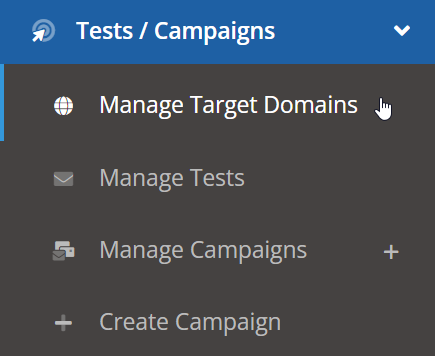
To get to the Manage Target Domains page, go to **Tests / Campaigns** \> **Manage Target Domains**.
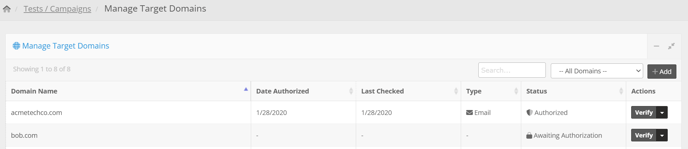
This will open the **Manage Target Domains** page. If a domain has been authorized (i.e. you don't need to send a Campaign Authorization email to someone on that domain), then it will say "Authorized" under the status column.
#### How to Pre-Authorize Domains
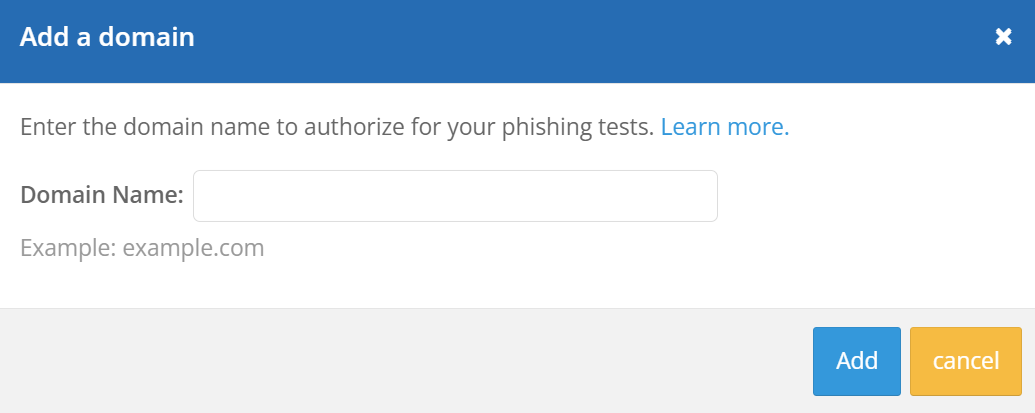
Pre-authorized domains allow you to bypass sending an authorization email for every domain you are testing. To add a new domain, simply click the **Add Domain** button. A pop-up window will appear where you can enter the domain to be added.
- *NOTE: After one domain is added on a Single account, the "Add" button will no longer be available. To add more domains, you must contact your Account Manager to get them approved.*
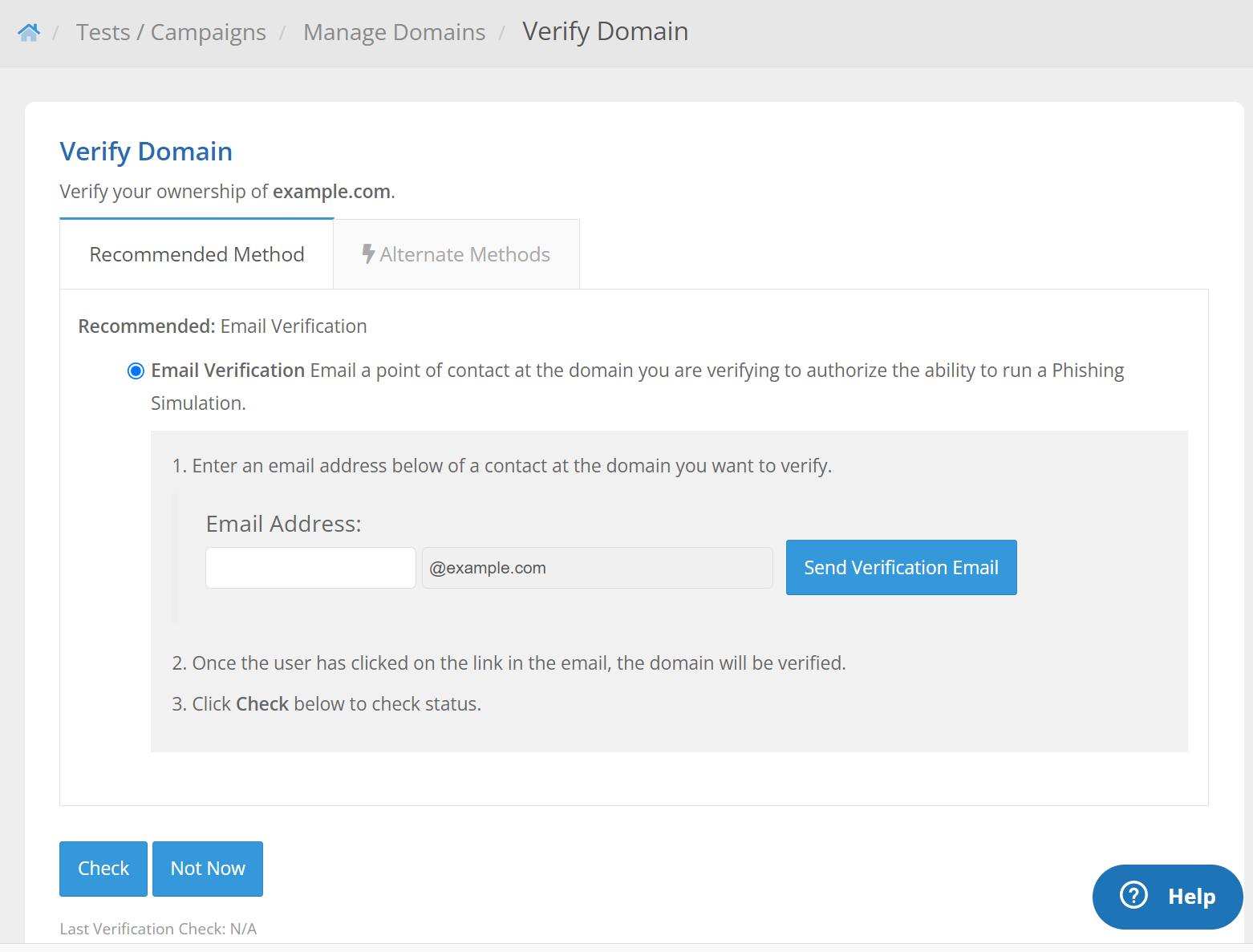
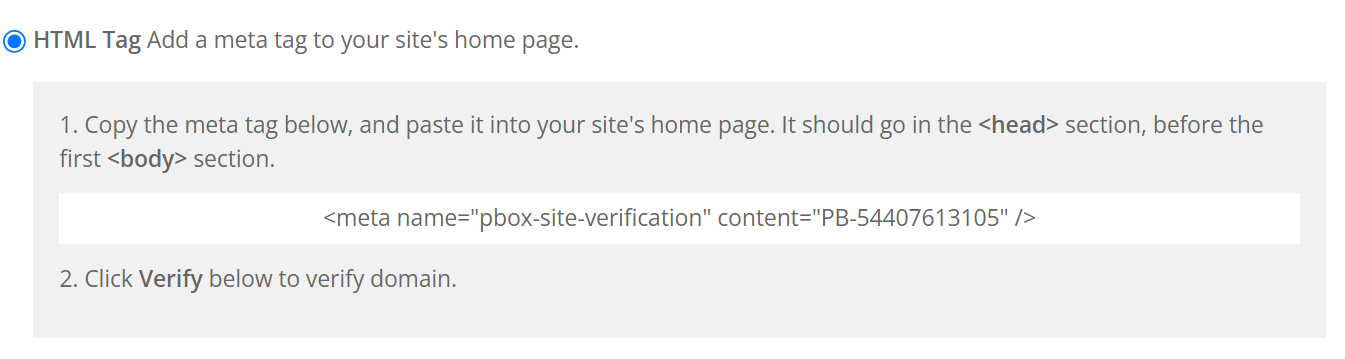
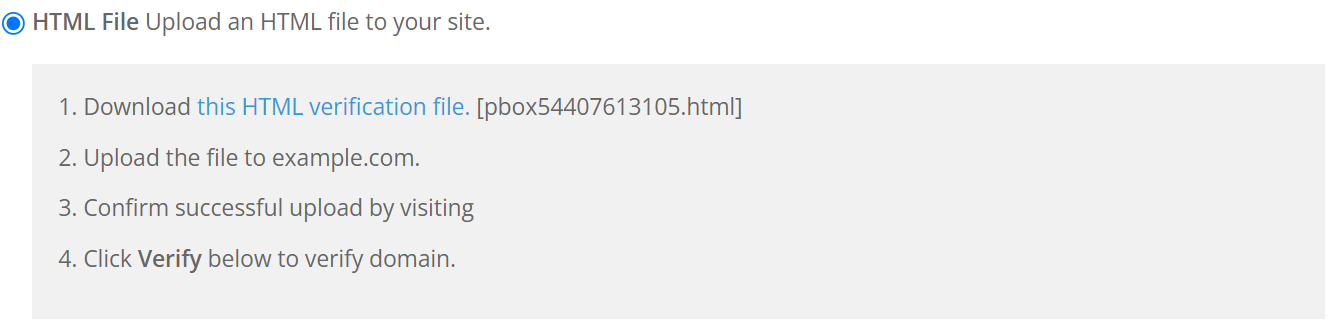
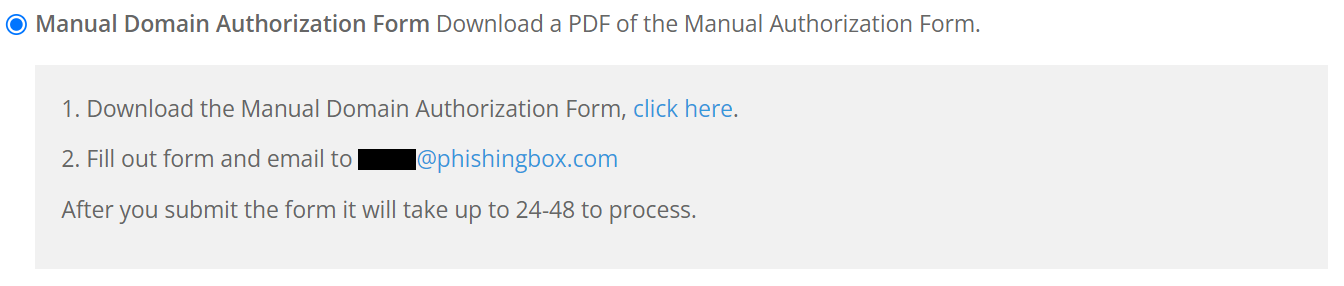
Once added, you will be transferred to the **Verify Domain** page where you can select the method you wish to use in order to verify the domain. There are four methods to choose from:
- Email (recommended)
- HTML tag
- HTML file
- Manual authorization form
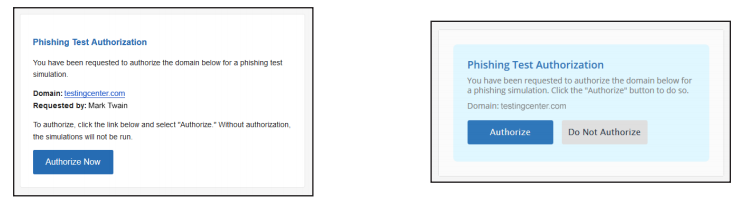
Simply enter the authorizer’s email address and click **Send Verification Email**.
The recipient will receive an email similar to the one on the left. After clicking **Authorize Now**, they will be taken to a page similar to the one on the right where they approve the authorization.
The remaining three methods are listed below with instructions on how to implement them:
- [Getting Started](https://support.hooksecurity.co/getting-started?hsLang=en#main-content)
- [General](https://support.hooksecurity.co/getting-started?hsLang=en#general)
- [General Safelisting](https://support.hooksecurity.co/getting-started?hsLang=en#general-safelisting)
- [Microsoft Safelisting](https://support.hooksecurity.co/getting-started?hsLang=en#microsoft-safelisting)
- [GSuite Safelisting](https://support.hooksecurity.co/getting-started?hsLang=en#gsuite-safelisting)
- [Firewall/Spam Filter Safelisting](https://support.hooksecurity.co/getting-started?hsLang=en#firewall-spam-filter-safelisting)
- [Creating Groups/Adding Targets](https://support.hooksecurity.co/getting-started?hsLang=en#creating-groups-adding-targets)
- [Reporting Plug-In](https://support.hooksecurity.co/getting-started?hsLang=en#reporting-plug-in)
- [3rd Party Integrations](https://support.hooksecurity.co/getting-started?hsLang=en#3rd-party-integrations)
- [Platform Settings](https://support.hooksecurity.co/getting-started?hsLang=en#platform-settings)
- [Hook Academy](https://support.hooksecurity.co/hook-academy?hsLang=en#main-content)
- [Campaign Ideas](https://support.hooksecurity.co/hook-academy?hsLang=en#campaign-ideas)
- [Industry Specific Campaigns](https://support.hooksecurity.co/hook-academy?hsLang=en#industry-specific-campaigns)
- [Course Reviews](https://support.hooksecurity.co/hook-academy?hsLang=en#course-reviews)
- [Mastering Reporting](https://support.hooksecurity.co/hook-academy?hsLang=en#mastering-reporting)
- [Becoming Compliant](https://support.hooksecurity.co/hook-academy?hsLang=en#becoming-compliant)
- [Suggest a Hook Academy Topic](https://support.hooksecurity.co/hook-academy?hsLang=en#suggest-a-hook-academy-topic)
- [Tests/Campaigns](https://support.hooksecurity.co/tests-campaigns?hsLang=en#main-content)
- [Reseller Only](https://support.hooksecurity.co/tests-campaigns?hsLang=en#reseller-only)
- [School](https://support.hooksecurity.co/school?hsLang=en#main-content)
- [3rd Party Integrations](https://support.hooksecurity.co/school?hsLang=en#3rd-party-integrations)
- [Troubleshooting](https://support.hooksecurity.co/school?hsLang=en#troubleshooting)
- [Branding](https://support.hooksecurity.co/school?hsLang=en#branding)
- [Course](https://support.hooksecurity.co/school?hsLang=en#course)
- [Students](https://support.hooksecurity.co/school?hsLang=en#students)
- [Automations](https://support.hooksecurity.co/school?hsLang=en#automations)
- [Reports](https://support.hooksecurity.co/reports?hsLang=en#main-content)
- [Generate Reports](https://support.hooksecurity.co/reports?hsLang=en#generate-reports)
- [FAQs](https://support.hooksecurity.co/faqs?hsLang=en#main-content)
- [Troubleshooting](https://support.hooksecurity.co/faqs?hsLang=en#troubleshooting)
- [Campaign of the Month](https://support.hooksecurity.co/faqs?hsLang=en#campaign-of-the-month)
- [Reseller Guide](https://support.hooksecurity.co/reseller-guide?hsLang=en)
- [Hook Security Updates](https://support.hooksecurity.co/hook-security-updates?hsLang=en)
- [Onboarding Guides](https://support.hooksecurity.co/onboarding-guides?hsLang=en)
- [Managed Services](https://support.hooksecurity.co/managed-services?hsLang=en)
- [Default HubSpot Blog](https://hooksecurity-6535385.hs-sites.com/blog)
[](http://hooksecurity.co)
Proudly Headquartered in Lakeland, Floirda
Copyright © 2026, Hook Security Inc.
```json
{
"@context" : "https://schema.org",
"@type" : "VideoObject",
"description" : "The Manage Target Domains page provides a list of all domains that you have either authorized to send simulated phishing emails to or have previously tested targets belonging to that domain.",
"duration" : "PT1M1S",
"embedUrl" : "https://www.youtube.com/embed/sHrqbcdTkAc",
"name" : "How do I manage target domains?",
"publisher" : {
"@type" : "Organization",
"logo" : "https://www.hooksecurity.co/hook-logo.png",
"name" : "Hook Security",
"url" : "https://www.hooksecurity.co"
},
"thumbnailUrl" : "https://img.youtube.com/vi/sHrqbcdTkAc/maxresdefault.jpg",
"uploadDate" : "2021-12-28T08:59:55-08:00"
}
```